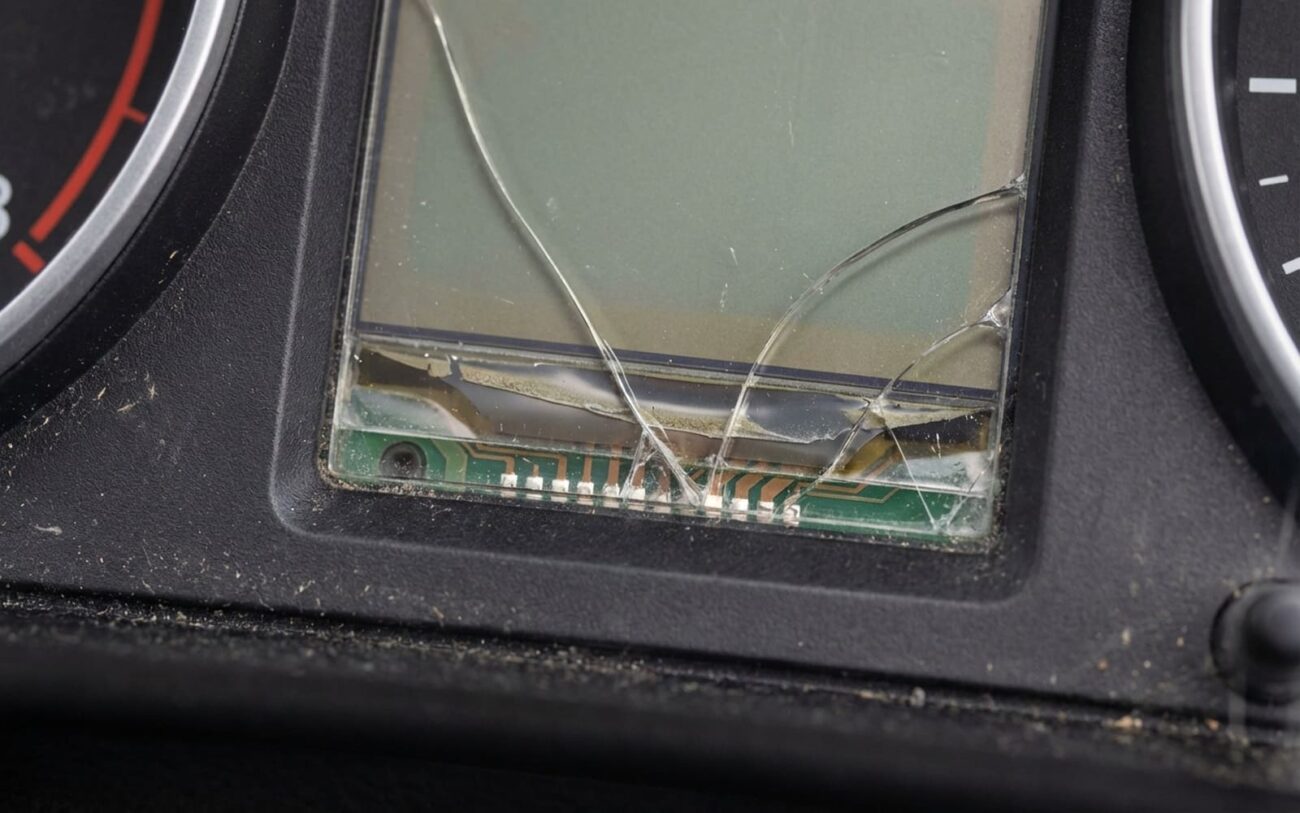
You’re not crazy. That screen going dark when the sun hits the dash? I’ve seen it a hundred times—Audi A4s, VW GTIs, Tiguan L’s, you name it. Digital Cockpit, Virtual Cockpit, MIB2, MIB3—it doesn’t matter. When the LCD blacks out under sun load and comes back after it cools, that’s not a software hiccup. That’s the display dying. And if you’re driving without speed, temp, or oil pressure readings, you’re not just inconvenienced—you’re at risk.
What’s Actually Failing (Spoiler: It’s the LCD)
I’ll cut to the chase: this is a hardware failure. The LCD panel itself is breaking down under heat. Not the control module, not the software, not the wiring. The glass stack inside that screen—polarizers, liquid crystal, adhesive layers, driver circuits—is getting cooked.
On a hot summer day, your dash can hit 80–90°C (176–194°F). Most OEM LCDs are rated to 60–70°C. That’s a hard limit. When you exceed it, the liquid crystal fluid loses alignment. The optical adhesive softens. The polarizer delaminates. You get dimming, ghosting, rainbow swirls, or total blackout. Cool it down? It works again—until the next heat cycle.
And yes, it’s temporary—until it isn’t. I’ve had customers bring in cars after driving for weeks with intermittent cluster failure. One guy made it to the shop with a blown engine because he didn’t see the oil pressure warning. That’s not a screen issue. That’s a safety-critical system failure.
How to Confirm It’s the LCD (Not Something Else)
Before you drop $1,500 on a new cluster, rule out the mimics. The big three: LCD panel, control module (J285, J794, etc.), or LVDS ribbon cable. Replacing the wrong one burns time and money.
Here’s how I test—fast and definitive.
| Symptom | Likely Cause | Common Mimics | How I Confirm |
|---|---|---|---|
| Screen blanks in heat, returns when cool | LCD polarizer delamination or LC fluid failure | Control module thermal shutdown |
When blank, shine a flashlight at a 45° angle. If you see a faint image (ghosting), the module is sending signal—the LCD is dead. Scan with VCDS/ODIS: if no module faults, it’s not the brain. |
| Dim or patchy display in heat | TFT matrix or LC degradation | Failing LED backlight or inverter |
Pull the cluster. In a dark room, inspect the backlight. If it’s even, but the image is smeared or blocky, it’s the LCD. Command 100% brightness via ODIS—if no change, it’s not the LEDs. |
| Flickering or blanking with heat or vibration | Cracked solder joints on LCD driver IC | Loose LVDS cable or connector |
With power on, gently flex the LCD edges with a plastic tool. If it flickers, it’s internal. Check LVDS continuity with a multimeter—but if the ribbon is intact and you still have issues, it’s the panel. |
One more thing:
If the cluster has no power—no lights, no button response, blown fuses—that’s not this. That’s a power supply, ground, or control module issue. This guide is for when the cluster powers up but the screen won’t display.
Fix It Right: Your Repair Options
There are only three real paths. I’ll tell you which ones work—and which ones I avoid.
This Isn’t a DIY Job
I’ve seen too many clusters turned into paperweights. These aren’t consumer electronics. You need ESD protection, micro-soldering, factory software, and calibration tools. If you’re not set up for that, don’t try.
LCD Panel Replacement Professional Only
Complete Unit Swap Most Reliable
Band-Aid: Sunshade (Yes, Really)
Did It Work? How to Test the Repair
Don’t call it fixed until it’s proven.
For an LCD replacement: run the factory test pattern. Check for dead pixels, edge bleeding, or pressure marks from bad adhesive. Then heat it—use a heat lamp or park in full sun for 90 minutes. Surface temp should hit at least 50°C. If it blanks or flickers, it’s not done.
For a full cluster swap: road test for 30+ minutes in direct sun. Verify every function—speedo, tach, fuel, warnings, steering wheel buttons, nav. Use an IR thermometer on the cluster housing. If it works at 60°C, you’re good. If not, something’s off in the coding or the donor unit was bad.
Cost vs. Value: Is It Worth It?
LCD Panel Repair
DIY (part + tools): ~$200 + ~$500
Success Rate: 85% (experienced specialist)
Risk: Board damage, total failure.
Complete Cluster (New)
DIY: N/A (coding required)
Success Rate: 98%
Risk: Immobilizer lockout, feature loss.
Used Cluster
DIY (part + coding): ~$500 + ~$300
Success Rate: 90%
Risk: Latent heat damage, mileage mismatch.
Rule of thumb: if the repair costs more than 40% of the car’s value, and it’s otherwise solid, ask yourself—is this car worth the investment? On a $3,000 beater, maybe not. On a $15,000 A6 with low miles? Absolutely. But don’t ignore it just because it “comes back.” That’s how you lose an engine.
Prevention: Keep It Cool, Keep It Working
What I Tell My Customers
-
Use a sunshade. Every time. The $20 reflective kind cuts dash temps enough to double LCD life. I’ve got customers with 2017 Audis still on original clusters—because they never park without one.
-
Watch for early signs: ghosting, rainbow swirls at an angle, slow wake-up in heat. That’s your warning. Don’t wait for total failure.
-
After a repair? Keep using the shade. You just spent $1,200—don’t roast the new one.
