After 25 years under the hood, I’ve seen just about every kind of electrical gremlin a car can throw. But few things are as frustrating, or as telling, as a dead gateway module. When this thing goes, it’s not like a simple sensor failure; it’s like the whole central nervous system of the car just went on strike. You’re left with a vehicle that starts and runs, but won’t talk to you, or to itself, properly. Let me walk you through what I typically see and how I approach it in the shop.
The Symptoms: What a Dead Gateway Feels Like
Alright, so you plug in your scan tool, maybe even a high-end factory-level unit, and you get nothing. Just a “timeout” message, or no module list at all. It’s a total communication failure. That’s the first big red flag for me.
But here’s the kicker: the car usually still starts. The engine fires right up, headlights come on, the starter engages without a hitch. Yet, the instrument cluster is often blank, or maybe it’s flickering wildly. The infotainment system? Dead. HVAC controls? Unresponsive. You’ve got power, but no intelligence, no coordination between the systems. It’s like the car’s body is moving, but its brain is asleep. This weird split between basic mechanical operation and complete electronic silence is a classic sign of a gateway module that’s checked out.
NETWORK GATEWAY
Response: NULL
Think of the gateway like the post office for your car’s electronic modules. If the post office is locked, the mail (data) still exists, but no one can send or receive their letters. The engine control unit (ECM) might still be running the engine, but it can’t tell the instrument cluster what’s going on, or coordinate with the transmission control unit (TCU). You’re left with a car that’s working in isolation, not as a cohesive system.
While it won’t necessarily leave you stranded immediately, driving it like this is a bad idea. You risk transmission damage from mismatched shift logic, critical safety systems like ABS and airbags won’t communicate (meaning they’re disabled), and you lose the ability to monitor any faults. The car is running on basic fallback strategies, not its full, intended functionality.
My Diagnostic Process: Hunting Down a Dead Gateway
When I get a car with these symptoms, I don’t just jump to “dead gateway.” You’ve got to rule out the simple stuff first. No communication doesn’t automatically mean the gateway is fried. It could be a faulty scan tool, a damaged OBD2 cable, a blown fuse, or even just a wiring fault. Here’s my step-by-step:
Step 1: Start at the OBD2 Port
With the ignition on, I grab my digital multimeter. I’m checking the OBD2 port itself. Specifically, I look at pins 6 (CAN-High) and 14 (CAN-Low). You should see approximately 2.5 volts on each of those pins. Then, with the ignition off, I check the resistance between pins 6 and 14. It should be right around 60 ohms. That 60-ohm reading tells me the CAN bus is electrically active and its termination resistors are intact. If I see 0V or battery voltage on both pins, the problem is likely in the wiring to the port, or a shorted module is pulling the whole bus down.
Step 2: Check for Other Communication
If the OBD2 port checks out with proper voltage and resistance, then I know the network is alive electrically. That means the issue isn’t typically a power or wiring problem to the bus itself, but rather a data routing issue. That points me squarely towards the gateway module. But before I condemn it, I’ll try to communicate with any module that might be directly on the bus, like the ECM, if possible. Sometimes one module will still respond, and I can pull U-codes like U0100 (lost communication with ECM) or U0101 (lost communication with TCM). These “lost comm” codes, especially across multiple unrelated systems, are strong indicators that the gateway isn’t doing its job.
Step 3: Verify Gateway Power and Ground
Next, I need to make sure the gateway module itself has proper power and ground. I’ll grab the service manual to locate it – they’re often tucked away under the dash near the steering column or inside the center console. Once I find it, I’ll check its power supply pins for battery voltage and confirm the ground circuit has less than 0.5 ohms of resistance back to the battery negative terminal. I’ve seen countless times where a corroded ground point, like G200 on many GM and Chrysler vehicles, will mimic a gateway failure perfectly. You’d be surprised how often a simple ground issue can cause such widespread chaos.
My rule of thumb: Only after I’ve confirmed good power, good ground, and proper network voltage/resistance at the DLC (Data Link Connector) do I truly suspect an internal gateway fault. Don’t skip these basic electrical checks!
Why These Modules Give Up the Ghost
Once diagnostics confirm the gateway is indeed the problem, the root cause usually falls into one of three main categories:
- Power Supply Failure: Inside these modules are tiny surface-mount voltage regulators and filter capacitors. Over time, heat cycles and constant electrical stress degrade them. I’ve pulled gateways from vehicles where you could clearly see bulging or leaking capacitors under magnification, especially in models known for poor thermal management in the cabin electronics. That’s a classic internal component failure.
- Firmware Corruption: This is a real-world headache. If the car’s battery dies completely, or if a software update is interrupted (say, a power glitch during programming), the gateway’s firmware can get corrupted. Unlike simpler modules, the gateway often handles secure authentication and VIN-specific configurations, so corrupted flash memory can render it completely unresponsive, even if it has good power.
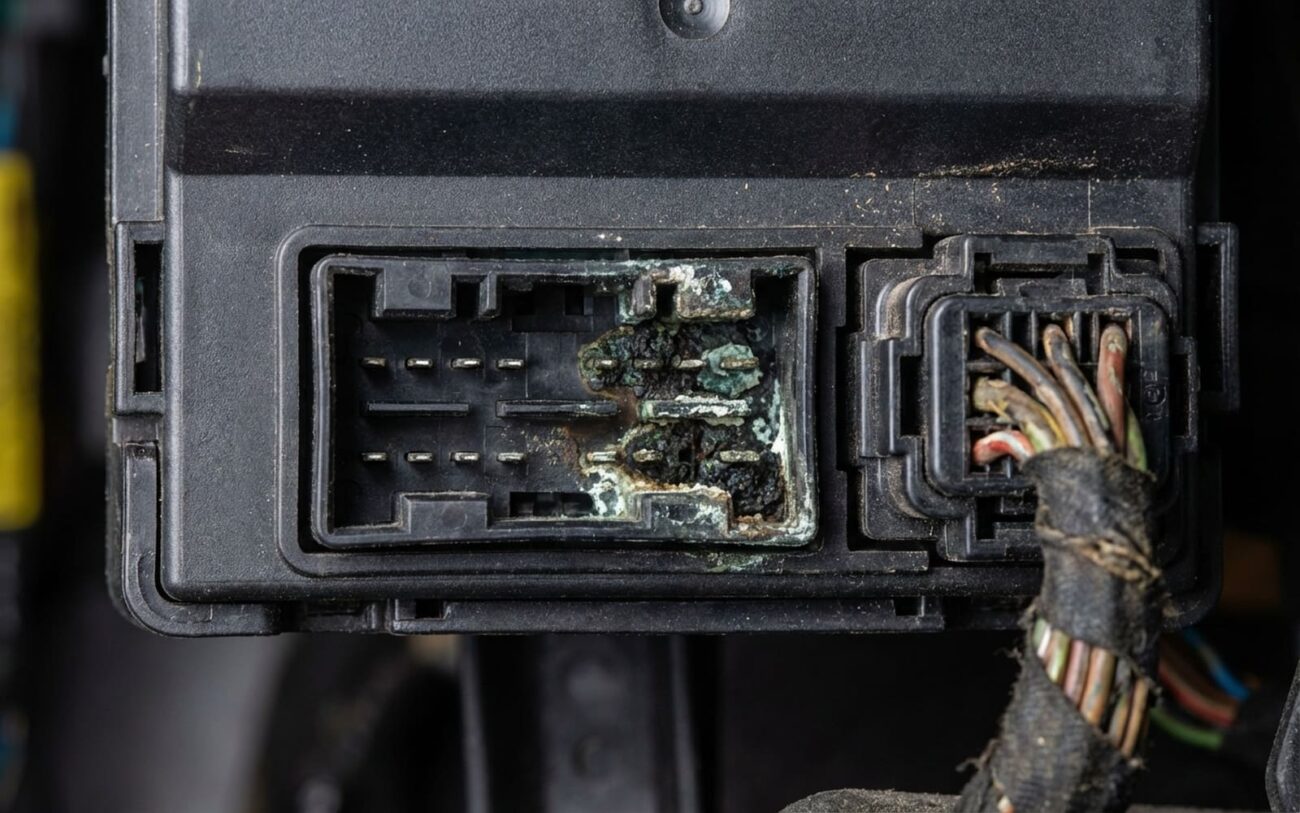
- Environmental Damage: Less common, but it happens. Water intrusion from a leaky sunroof, a poorly sealed windshield, or even a spilled drink can corrode the delicate circuitry. I’ve seen it more than once.
It’s important to remember: if you’ve only got one system acting up, like a power window not working, that’s almost certainly not a gateway issue. A gateway failure causes widespread, often seemingly unrelated, communication problems across multiple systems.
Repairing a Failed Gateway: What Works, What Doesn’t
Connector Repair DIY Feasible
Module Replacement & Programming Professional Only
Validating the Repair: My Final Checks
After any repair, whether it’s cleaning a connector or installing a new module, verification is absolutely critical. For a connector fix, I’ll reconnect the battery and immediately plug in my scan tool. I need to see full communication with all modules – ECM, TCM, BCM, ABS, SRS – without any delays or timeouts. The instrument cluster should light up normally, and all those previously unresponsive systems (radio, climate control) should operate exactly as expected.
When a new gateway module has been installed and programmed, I always run a full network test with a bidirectional scan tool. I’ll check for any stored U-codes, especially those “lost communication” codes like U0100 (lost communication with ECM) or U0121 (with TCM), and clear any that appear. A truly successful repair means not just that the codes are gone, but that the entire network operates cohesively, responds quickly, and remains stable under different ignition states and driving conditions.
Costs and Prevention: The Bottom Line
Let’s talk money. A gateway module failure can be one of the pricier electrical repairs, mainly due to the programming complexity.
| Repair Type | DIY Cost | Shop Cost | Success Rate |
|---|---|---|---|
| Connector Repair | < $50 (cleaner, grease) | $100 – $300 (labor) | High (if corrosion is the only issue) |
| Module & Programming | $800+ (for tools, if you DIY) | $500 – $1,500 (part + labor + programming) | Near 100% (with OEM programming) |
My Two Cents on Value:
If the repair estimate starts creeping up to 35–40% of your vehicle’s current market value—say, an $1,800 repair on a $5,000 car—it’s time to seriously consider if the investment makes sense. Gateway failures, unfortunately, can be that tipping point for older vehicles. I’ve seen it many times.
Keeping Your Gateway Healthy: A Few Tips
-
Maintain stable voltage. This is huge. A failing battery or alternator can cause voltage spikes and drops that corrupt module firmware in an instant. Replace weak batteries before they completely die.
-
Don’t use your car to jump-start others. Those sudden surges of power can stress sensitive electronics, including the gateway.
-
Protect the module from moisture. If you’ve had sunroof leaks, windshield leaks, or even a persistent damp carpet, inspect the area around where the gateway module is located. Water and electronics don’t mix.
-
Pay attention to early warning signs. Flickering instrument clusters, sporadic radio resets, or odd communication glitches that come and go could be your gateway giving you a heads-up before it completely fails.
