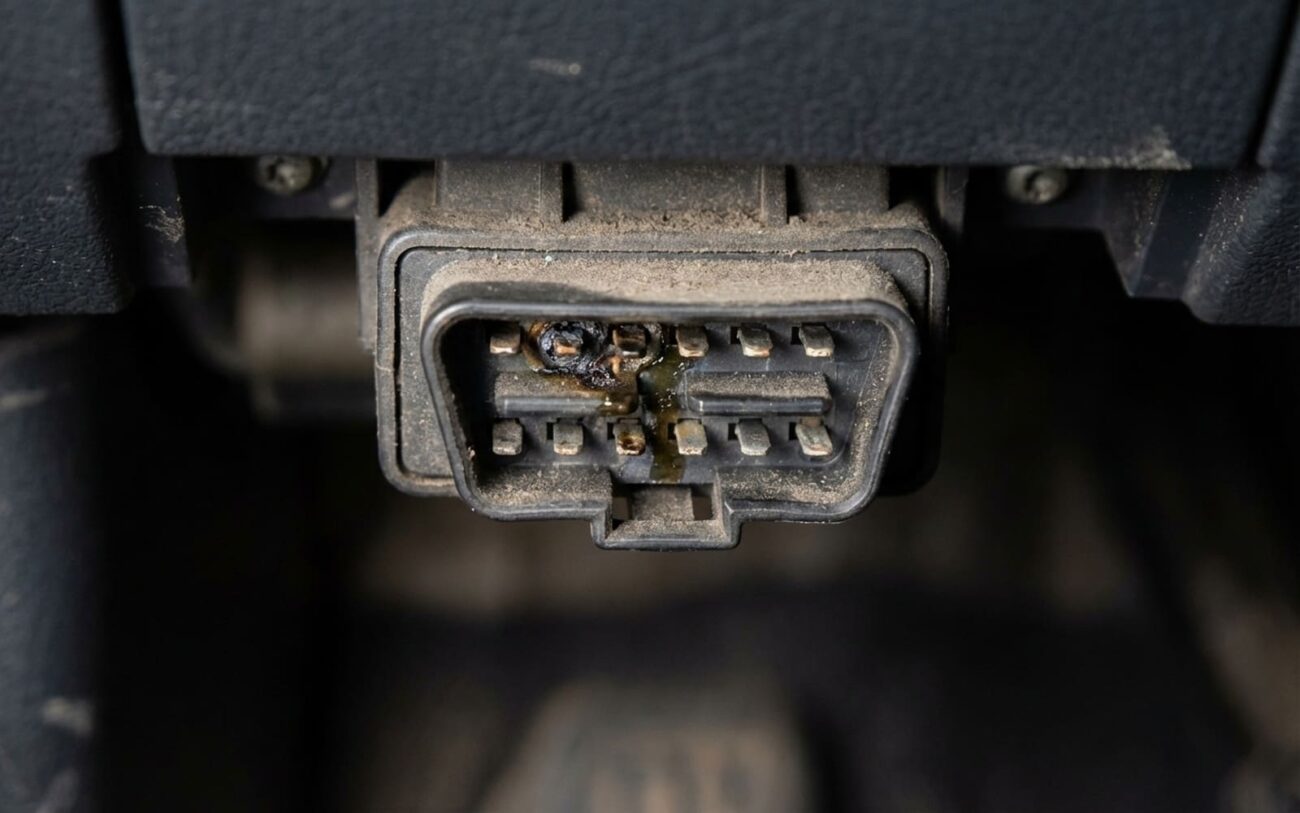
OBD2 port not talking to your scanner? Yeah, I see this at least twice a week in the shop. And before you start blaming the ECU or some deep CAN bus mystery—stop. In over 80% of cases, it’s not a computer problem. It’s power, ground, or physical damage at the port itself. I’ve pulled apart hundreds of these, and the real issue is usually staring you right in the face—if you know where to look.
First: What’s Actually Happening?
Two things can go wrong here—your scanner either won’t power on, or it powers up but says “No Communication.” These aren’t the same. One’s a power issue. The other’s data.
If the scanner stays dark? That’s pin 16—OBD2’s power feed. No voltage, no life. This circuit usually shares a fuse with the cigarette lighter or 12V outlet. Blown fuse? Both go dead. Seen it a thousand times on Honda Civics and Ford Explorers alike.
If the scanner powers but won’t talk? That’s CAN bus territory. Pins 6 (CAN High) and 14 (CAN Low) carry the signal. They’re tiny. Easy to bend. Easy to corrode. And if one’s recessed even slightly, connection fails. I’ve had customers bring in scanners they thought were broken—turned out a single bent pin from forcing in a cheap code reader.
Diagnostic Flow: Cut the Guesswork
Don’t start swapping parts. Grab a multimeter and test. This takes 10 minutes and saves you hours of frustration.
Step 1: Power Check (Scanner Won’t Turn On)
Key ON, engine OFF. Backprobe pin 16 at the DLC. You should see battery voltage—around 12V. If not, check the fuse. Look for labels like “ECU-B,” “DLC,” “OBD,” or “CIG.” Same fuse, different name depending on the manufacturer.
If the fuse is good but no voltage, trace the wire from the fuse to the port. I’ve found broken wires in the harness near the kick panel on more than a few Toyotas—chafed from foot movement over years.
Also check ground. Pins 4 (chassis ground) and 5 (signal ground) should have continuity to battery negative. Less than 0.5 ohms. If not, clean the ground point or repair the wire. Ground issues mimic power failures.
Step 2: CAN Bus Check (Scanner Powers But No Comm)
First, verify the basics. Key ON. Measure DC voltage between pins 6 and 14. You should see 2.5 to 2.7 volts. That’s the bias voltage on a healthy CAN network.
No voltage? Could be a dead module pulling the bus down, or a short in the harness. But don’t assume it’s the ECU yet.
Now, key OFF. Disconnect the battery. Set your meter to resistance. Measure between pins 6 and 14. You should read about 60 ohms. Why? Because there are two 120-ohm termination resistors in parallel—one usually in the ECU, one in the instrument cluster or another module.
If you see open circuit (OL), one resistor is missing or disconnected. If it’s way low—like 20 ohms—there’s a short or extra resistor somewhere. If it’s 120 ohms, someone removed a module and forgot to terminate the bus.
On a 2018 Ram 1500 I worked last month, the resistance was 30 ohms. Turned out the trailer brake controller had shorted the CAN lines. Unplugged it—back to 60. Problem solved.
What Actually Fails (And What Doesn’t)
The OBD2 port itself? That plastic block under the dash? It fails. Not the ECU. Not the network. The port.
Pins corrode—especially in coastal areas or where road salt’s used. White or green crust? That’s oxidation. I’ve pulled connectors out of Subarus in Maine that looked like they’d been in the ocean. Clean them with contact cleaner and a dental pick—gently. Don’t gouge the plating.
Bent pins? Super common. Pin 6 and 14 are delicate. If someone jammed in a scanner at an angle, they can bend or retract. I use a bent paperclip or a pin extractor tool to carefully pull them back. But if the pin’s cracked at the base? Replace the whole pigtail.
And yes—some scanners make this worse. I’ve seen aftermarket tools with loose connectors that wobble and grind the pins down over time. Like sandpaper. Stick with quality gear. It pays off.
Repair & Validation: Don’t Call It Fixed Too Soon
So you cleaned the pins, replaced the fuse, or spliced in a new pigtail. Great. But don’t just plug in the scanner and walk away.
Validation means the system works under real conditions. Here’s what I check:
-
Scanner powers every time—no wiggling needed.
-
Communicates with engine, transmission, ABS, airbags—full module handshake.
-
Live data streams without dropouts. Watch RPM, fuel trim, coolant temp—see if they update smoothly.
-
Multimeter confirms: ~12V on pin 16 (key ON), ~2.6V between 6 and 14, ~60 ohms resistance (key OFF, battery disconnected).
If you did a wiring repair—say, a new pigtail or harness splice—go further. Check voltage drop under load. With the scanner active, measure across the repair point. Should be less than 0.1V. More than that? High resistance. Bad crimp or cold solder joint.
Also test insulation. Set your meter to megaohms. Check from repaired wires to ground and adjacent circuits. Should read over 10 MΩ. If it’s lower, you’ve got a potential short waiting to happen.
Root Causes: What I Actually Replace
After 25 years, I can tell you the real failure points:
Fuse: Cheapest fix. Less than $5. But if it blows again, you’ve got a short. Don’t just keep replacing it. Find the load side fault—could be a chafed wire behind the radio or a bad USB adapter.
DLC connector: The plastic port wears out. Contacts lose spring tension. I’ve seen pins that looked fine but wouldn’t make contact because the spring was weak. Replacement pigtails are about $20. OEM lasts longer than aftermarket.
Wiring harness: If the wires are broken near the connector—common in older GMs and Fords—I replace the pigtail. Solder and heat-shrink, not crimp connectors. Crimps fail. I learned that on a 2005 Silverado that kept losing comms every winter.
Prevention: Keep It Working
Most of these failures are avoidable.
Once a year, pull down the panel and look at the port. If it’s dusty, blow it out. If it’s damp, clean and dry it. Then—this is key—apply a tiny dab of dielectric grease around the outer housing. Not on the pins. That keeps moisture out without interfering with contact.
And for the love of diagnostics, use a decent scanner. I’ve seen more OBD2 ports ruined by flimsy, wobbly adapters than anything else. Spend $50 on a solid one. Your car will thank you.
Every few months, plug in a basic code reader. Two minutes. Verifies communication. Catches issues before they strand you. I do this on my own truck. Simple habit. Prevents big headaches.
