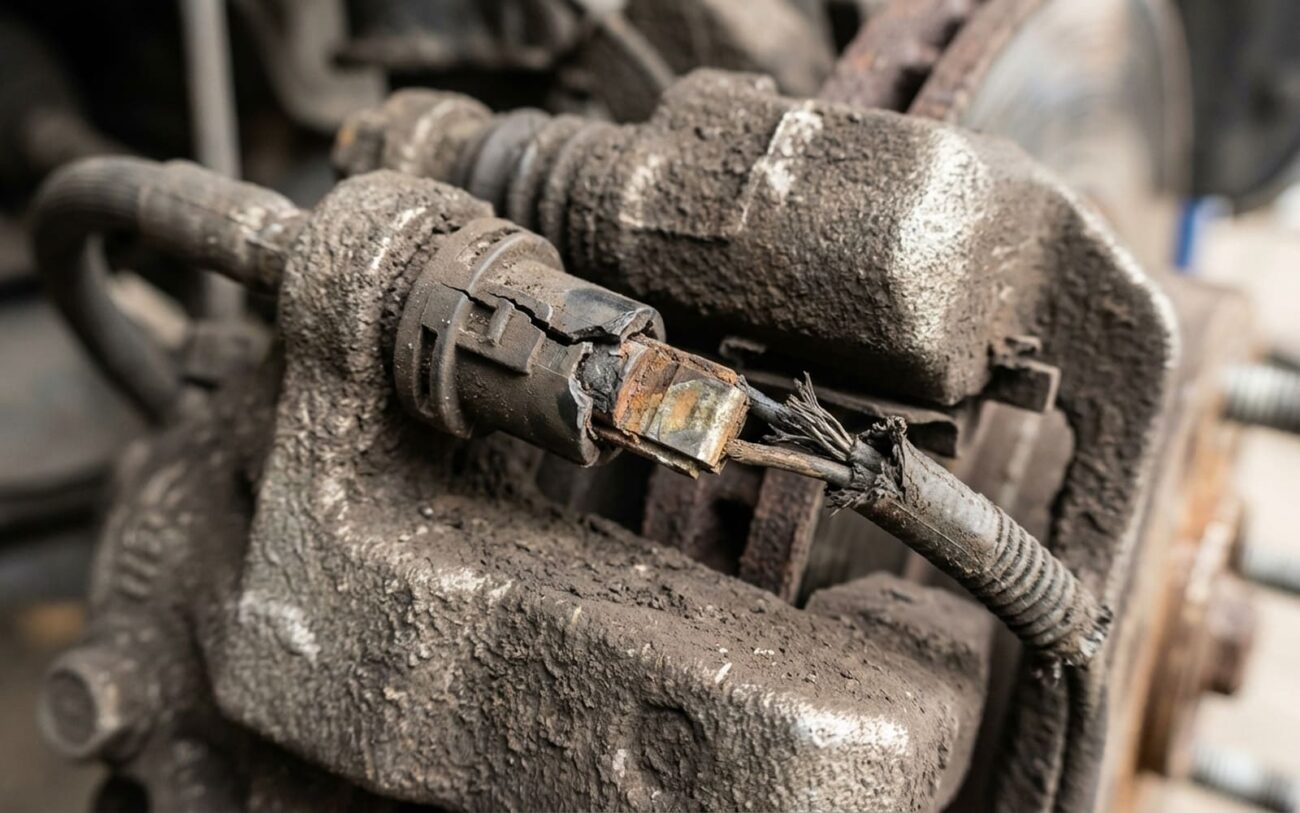
Alright, let’s talk brake warnings. In my 25+ years turning wrenches, I’ve seen a lot of folks get these signals mixed up, and that usually leads to wasted money or, worse, damaged rotors. Your car actually has two main ways of telling you the brake pads are getting thin, and it’s critical to know the difference between ’em. One’s electrical, one’s purely mechanical. They’re not the same thing, and confusing them can cost you.
The Two Warnings: Light vs. Squeal
First up, you’ve got the dashboard warning light. This is your car’s computer telling you something. It usually looks like a circle with parentheses around it (O) – that’s supposed to be a brake rotor and pads. When that light stays on after you start the engine, it means the system has detected an “open circuit” in the wear sensor system.
What’s an open circuit? Think of it like a broken wire. Most brake wear sensors are just a simple loop of wire embedded in the pad material. When the pad wears down enough, that wire gets cut, the circuit opens, and BAM – light on the dash. It’s a direct electrical signal, no guessing involved.
BRAKE MONITOR
Status: OPEN
Then there’s the high-pitched squeal you hear when you hit the brakes. This is a mechanical warning, completely separate from the electrical sensor. Most brake pads have a small metal tab, a “wear indicator,” built into them. When the pad material gets thin enough – usually around 2-3mm – that metal tab starts to scrape against the rotor. That’s the squeal you hear. It’s literally your brake system screaming for help, a purely physical alert that doesn’t need any fancy electronics.
My Diagnostic Approach: What to Check First
When a customer comes in with a brake warning, my first step is always to figure out which system is talking. It saves a lot of time and prevents unnecessary work. Here’s how I break it down:
| Symptom | Likely Cause (Primary) | Other Possibilities (Mimics) | How I Confirm It |
|---|---|---|---|
| Dashboard Warning Light (O) | The brake pad wear sensor wire has broken or worn through. This is an open circuit. | Damaged wiring harness, corroded connector, or a fault in the instrument cluster itself. |
I’ll visually inspect the sensor and wiring, then use a Digital Multimeter (DMM) to measure resistance at the sensor connector. A good sensor circuit should read 0–10 ohms. If it’s “OL” (Open Line) or very high resistance, that’s your break. |
| Audible Squealing During Braking | The brake pad’s mechanical wear indicator tab is contacting the rotor. | Glazed friction material, lack of lubrication on caliper pins, rust ridge on the rotor edge, or even a small stone trapped between the pad and rotor. |
This is a visual inspection job. I’ll pull the wheel and check the pad thickness. If it’s down to 3mm or less, that squeal is almost certainly the wear tab doing its job. I’ll also check for rotor condition and any foreign objects. |
Why Brake Wear Sensors Fail (Beyond Just Worn Pads)
Ideally, a brake wear sensor only triggers when the pad is actually worn down. But in the real world, I see plenty of premature failures. Knowing these helps with diagnosis:
Common Failure Modes I See:
- Thermal Fatigue: Brakes get HOT, sometimes up to 500°F. Those extreme temperature swings can crack the plastic housing of the sensor or even break the tiny internal wire, even if the pad isn’t fully worn.
- Corrosion: Road salt, water, and general crud get into everything. Over time, connector pins can corrode, creating high resistance and fooling the car’s computer into thinking the circuit is open. I see this a lot on older vehicles or those in salty climates.
- Physical Damage: The sensor wire is pretty delicate. Road debris, a rock, or even just snagging it during another repair can snap the wire or crack the housing.
Resolution Pathways: Fixing It Right
Safety First, Always.
Look, I’ve seen it all. Always use proper jack stands and a torque wrench. Don’t ever rely on a floor jack alone. And for crying out loud, never, ever use a jumper wire to bypass a brake wear sensor permanently. You’re disabling a safety system, and that’s just asking for trouble down the road.
Connector Cleaning & Maintenance
Sensor Replacement Axle Set Recommended
Full Pad & Sensor Service
Post-Repair Validation: Did It Work?
After any brake repair, you can’t just call it a day. You need to verify it actually worked. For a sensor replacement, it’s simple: start the vehicle. The brake pad warning light should go out. Then, take the car for a short test drive. I always do a few light to moderate stops to bed the pads slightly. The light absolutely must stay off – no flickering, no delayed activation. If it comes back on, you’ve still got a problem.
Making the Call: Cost, Risk & My Advice
Here’s what you’re generally looking at for costs, and where I usually draw the line:
Connector Repair
DIY cleaning and grease. In a shop, you’re looking at $50–$100 for the diagnosis time alone.
Sensor Replacement
Parts only, per axle. Shop cost: $150–$300 including labor for an axle set.
Full Pad & Sensor
Professional shop rate for full axle service. DIY parts: $100–$250.
My Honest Take:
If diagnosing a tricky sensor circuit fault is going to cost you more than half the price of just doing a full pad and sensor replacement, just do the full job. It’s rarely worth chasing a wiring fault for hours on pads that are already 70% worn. You’ll thank yourself later.
Prevention & Monitoring: Keep ‘Em Healthy
Maintenance Best Practices I Stand By:
-
Always replace sensors when replacing pads. I’ve seen too many people try to save a few bucks by reusing an old sensor, only for it to fail a month later. It’s a false economy, plain and simple.
-
Respond to early warnings. If you hear that squeal, don’t put it off. Get those pads inspected within a couple hundred miles. Waiting just increases your risk of rotor damage.
-
Perform visual checks during tire rotations. When the wheels are off, take a quick look at the brake pads and the sensor wiring. Look for obvious chafing, loose clips, or anything that looks out of place. It takes literally 30 seconds.
