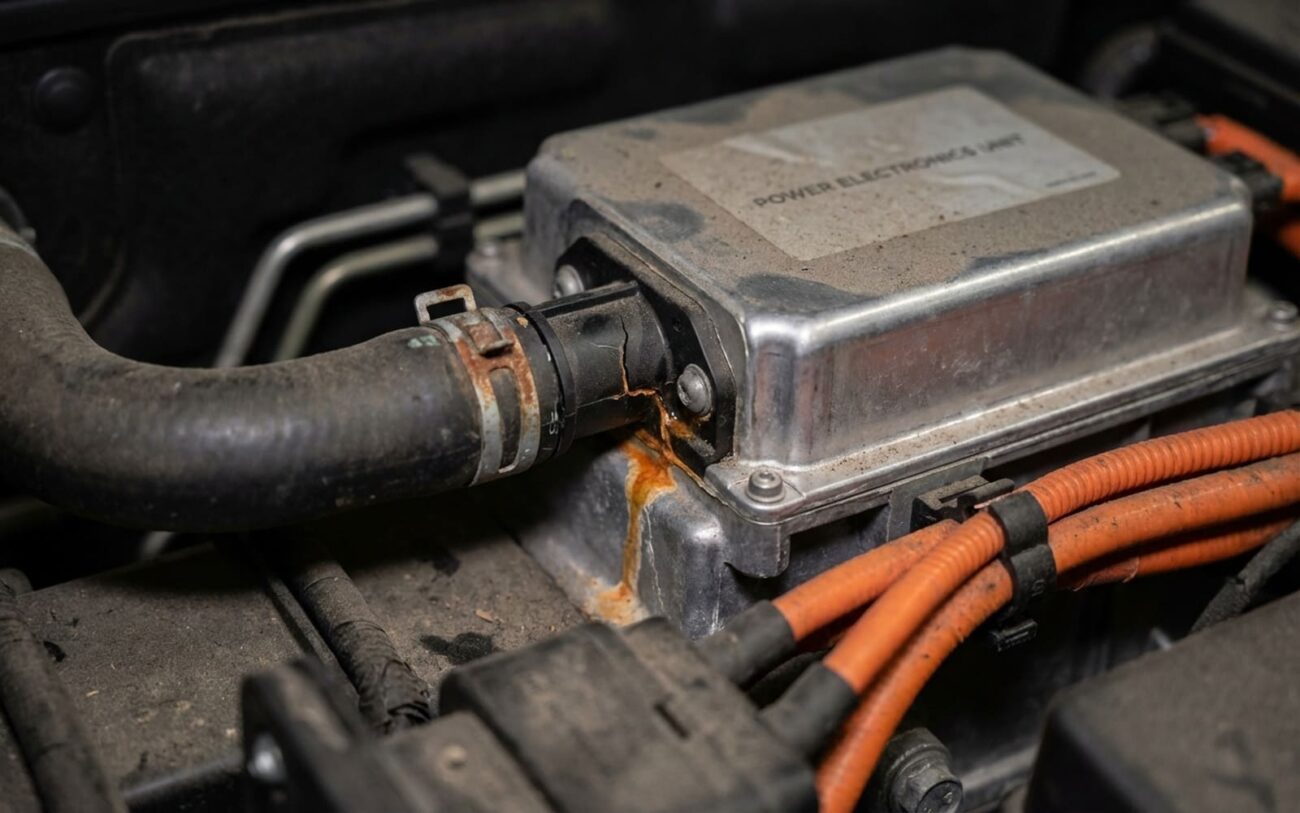
When Your Tesla’s Coolant Pump Dies: What You’ll See (and Feel)
Alright, let’s talk about a common headache I see in the shop with Model 3s: a failing low-temperature coolant pump. When this thing starts to go, your car isn’t subtle about it. You’ll usually get hit with a big red “Powertrain warning – power reduced” message. And often, right after that, or sometimes even at the same time, a coolant-level alert pops up.
That’s not just a friendly reminder; it’s your Tesla trying to save its own skin. The low-temp pump is responsible for circulating that special glycol-based coolant through the power electronics, the drive unit, and the battery chiller. If it quits, or even if it’s just barely moving fluid, heat builds up fast in those critical components like the inverter and motor controller. The car’s thermal controller sees those temps climbing and immediately puts the brakes on, reducing power to prevent some seriously expensive damage.
You’ll feel it too. The car will be sluggish, like it’s pulling a heavy trailer. Top speed gets limited, and those warnings might just keep coming back. In my 25+ years, when I see this combo on a Model 3, my first thought always goes to that low-temp pump in the Powertrain Cooling System (PCS) loop. Sure, a leak, an air pocket, or a bad level sensor can fool you, but nine times out of ten, it’s the pump itself.
My Diagnostic Approach: Don’t Just Guess!
This is where experience really pays off. A lot of shops will just see a DTC and throw a pump at it. That’s a quick way to waste your money if the real problem is a wiring harness, a corroded connector, or even the thermal controller itself. You gotta be systematic.
What the Scan Tool Tells Me
If you’ve got a professional-grade scan tool – like Tesla’s own Toolbox or a really capable aftermarket system – you’ll likely pull codes like P0BDD, “Coolant Pump Actuator Performance,” or “Pump Speed Deviation.” These codes mean the car commanded the pump to spin at X RPM, but it’s either not spinning at all or it’s way off. That’s a strong clue, but it doesn’t automatically mean the pump is dead.
Here’s how I use the scan tool: I’ll command that low-temp pump to 100% speed. Then I watch the actual RPM reading. If it’s commanded to 100% but shows 0 RPM, that tells me the pump isn’t moving. At that point, I grab my multimeter and check for voltage and ground right at the pump connector. No power? The problem is upstream – wiring, fuse, or the controller. Power present? Then yeah, the pump itself is probably toast.
Listening for Clues (But Not Relying on Them)
Sometimes, you might hear a whining or grinding noise coming from the frunk area, right where that low-temp pump lives. A seized bearing or a damaged impeller can definitely make some racket before it totally gives up. But be careful here. HVAC compressors, refrigerant lines, or even the high-temp coolant pump can make similar sounds. I never rely solely on noise; it’s just one piece of the puzzle.
If I do hear something suspicious, I’ll use a mechanic’s stethoscope to pinpoint the source. Then, in Tesla Service Mode, I can activate just the low-temperature coolant pump. If the noise only happens when that specific pump is running, then I’ve got my suspect.
Digging Deeper: Electrical Checks
For those DTCs like “Pump Speed Deviation,” it’s not always a mechanical failure. I’ve seen plenty of open or shorted wires, corroded pins in the connector, or even a faulty thermal controller cause the same code. That’s why I’ll perform a voltage drop test on both the power and ground circuits under load. If there’s excessive resistance in the wiring, the pump won’t get the juice it needs to run properly.
I also measure the motor winding resistance. You’ll need the service data for the exact spec, but it’s usually in the 0.5–3.0 ohms range. If it’s out of spec – like an open circuit or very low resistance – that confirms an internal electrical failure in the pump. And always, always inspect those connector pins for corrosion, bent pins, or signs of push-out.
Why These Pumps Fail in the First Place
The low-temp coolant pump in a Model 3 is a pretty sophisticated piece of kit: a brushless DC motor, an internal impeller, a Hall-effect sensor, and a magnetic rotor. They’re built tough, but nothing lasts forever. Over time, a few common issues tend to crop up.
Mechanically, the bearings and the shaft seal are the usual suspects. These pumps use either sleeve or ball bearings that just wear out from constant thermal cycling, age, or sometimes even contaminated coolant. Once they start to wear, you get more friction, noise, and eventually, the pump seizes up. The impeller, often made of a reinforced polymer, can also crack or delaminate. When that happens, the motor might still be spinning fine, but it’s not actually moving much coolant, if any. That’s a sneaky one.
The shaft seal is absolutely critical. It keeps the coolant on one side and the delicate motor windings and electronics on the other. If that seal fails, coolant seeps into the motor housing, leading to corrosion, short circuits, and winding failure. I see this a lot in higher-mileage vehicles; it’s a classic end-of-life failure mode.
Then there are the electrical failures: open or shorted motor windings, usually from thermal stress or moisture. And the internal Hall-effect sensor, which tells the thermal controller how fast the rotor is spinning, can fail too. That sensor going bad can trick the car into thinking the pump isn’t spinning, even if it is, leading to those pump speed deviation codes.
A quick note on false alarms:
I’ve seen early Model 3s throw false pump DTCs due to firmware glitches in the thermal controller. Sometimes, a simple software update is all it takes to clear the code and get things back to normal, no new hardware needed. Always check for active service campaigns or bulletins before you start tearing things apart. And remember, a clogged filter, a collapsed hose, or just a low coolant level can mimic a pump failure. Make sure you’re fixing the root cause, not just chasing symptoms.
The Fix: This Ain’t No DIY Job (Usually)
Professional Territory Only
Look, I can’t stress this enough: replacing this pump is a professional-only repair. You’re dealing with high-voltage components, a sealed coolant system that needs a very specific bleed procedure, and special dielectric coolant. One wrong move and you’re looking at a failed repair, more damage, or even a serious safety hazard.
To do this job right, you’ll need a few key things:
- An OEM or equivalent HV-ILC (High Voltage – Low Conductivity) coolant pump assembly. Don’t cheap out here.
- Tesla-approved HV-ILC coolant. It’s usually pink or red, glycol-based, and crucial for electrical isolation.
- A scan tool with full Tesla diagnostic mode access. This is non-negotiable for the coolant fill and bleed procedure.
- A coolant pressure tester to verify everything is sealed up tight afterward.
- And, of course, proper EV-safe tools and personal protective equipment (PPE), like insulated gloves and safety glasses.
The actual procedure starts with safely de-energizing the high-voltage system. That’s step one, always. Then, you drain the low-temp loop, pull back the frunk liner, and get to the pump. It’s usually mounted near the super bottle. Disconnect the electrical connector, unbolt it (typically 8 Nm – don’t overtighten!), and swap in the new pump. Be super careful reconnecting those hoses; some use swage clamps, others need torque-to-spec band clamps.
But here’s the kicker, and where most DIY attempts fall apart: refilling and bleeding. You absolutely HAVE to use the scan tool to kick off the automated bleed sequence. This cycles the pump and opens/closes various valves to force air out of the PCS loop. Skip this, and you’ll leave air pockets in the system, which will cause false temperature readings and recurring overheating. I’ve seen it countless times. And for the love of all that is holy, only use the specified coolant mixture. Mixing types or using standard antifreeze will lead to galvanic corrosion and seal degradation, killing your new pump prematurely.
Now, if your diagnostics only point to a corroded electrical connector – and the pump itself tests perfectly fine – then cleaning it with electrical contact cleaner and applying dielectric grease is a feasible DIY fix. But that’s a big “if.” Never try to bypass or jumper the pump; the car monitors it constantly, and you’ll just trigger more faults.
My Triple Check: Making Sure the Repair Actually Worked
Just replacing the pump isn’t the end of the job; it’s the beginning of validation. I always run through three key checks to make sure everything’s buttoned up correctly and working as it should.
First, back to the scan tool. I’ll command the pump to run across its full RPM range – say, 20%, 50%, then 100%. The actual RPM needs to track within 5% of what I commanded. Any lag, stutter, or significant deviation means there’s still an electrical or mechanical issue. While it’s running, I’m also listening for any unusual noises.
Second, I pressure test the system. I connect a coolant pressure tester to the low-temp reservoir and pressurize it to spec, usually around 15 psi. I let it sit for at least 15 minutes. If that pressure gauge doesn’t drop, I know the system is sealed up tight and leak-free. This is a critical step to catch any loose clamps or damaged hoses.
Finally, a functional drive test. I get the car out on the road and monitor live data, specifically focusing on the power electronics coolant inlet and outlet temperatures. Under load – like moderate acceleration or a hill climb – you should see a stable temperature delta across the cooler, typically between 5°C and 15°C. If that delta is minimal or fluctuating wildly, it tells me there’s poor flow, and almost always, that means trapped air. If that happens, I go right back to the shop and repeat the bleed procedure. This step is non-negotiable; air in the PCS loop completely defeats the purpose of the repair and will lead to future problems.
What’s This Going to Cost?
Let’s talk money. Here’s what you can realistically expect for a failed Tesla Model 3 low-temperature coolant pump repair.
If you’re trying to DIY this (which, again, I strongly advise against unless you’re a seasoned EV tech with the right tools), you’re looking at about $250–$450 for an OEM-equivalent pump, plus another $150 or so for the specialized coolant. Then you’ve got the significant investment in a Tesla-capable scan tool, which isn’t cheap.
Taking it to a qualified shop, you’re usually in the range of $750–$1,200. That covers the pump, the coolant, the diagnostics, the labor, and most importantly, the proper bleed procedure that prevents future headaches. This cost is a fraction of the car’s value and a tiny percentage of what a new drive unit would set you back if you let the problem fester. A failed coolant pump is a small component with massive downstream consequences.
For most owners, this repair is absolutely worth it. The only time I’d hesitate is if the vehicle has other major, unrelated issues – like a failing battery module or structural damage. But for a car otherwise in good condition, fixing this pump is essential for long-term reliability.
Always check your EV battery warranty status before authorizing any major repairs. While this pump isn’t typically covered under the battery warranty, it’s good practice to know your coverage.
Cost-Saving Tip
If your Tesla is out of warranty, don’t automatically head to the dealership. Independent EV specialists are popping up everywhere, and many offer high-quality service for these types of repairs at prices that can be 30–50% below dealership pricing. Just make sure they’re truly qualified and have the right tools and experience for Tesla thermal management systems. This isn’t a job for a general mechanic.
Keeping It From Happening Again: My Advice
Prevention starts with understanding that “lifetime” coolant isn’t truly forever. Tesla might claim extended longevity, but in the real world – with all the thermal cycling, tiny micro-leaks, and oxidation – coolant degrades. The industry standard for high-performance EV cooling systems is a coolant change every 5 to 7 years. And when you do it, use only Tesla-specified HV-ILC fluid. It’s crucial for maintaining dielectric integrity and preventing galvanic corrosion in the system.
As a driver, your best defense is simply paying attention. That first warning – reduced power with a coolant alert – is your fire alarm. Don’t push it. Stop driving and get it checked out. There’s no dashboard warning light that says “pump health is at 50%,” so regular maintenance is key.
I recommend an annual inspection by a technician who really knows Tesla’s thermal management system. That inspection should always include:
-
A scan tool check of the pump’s operational parameters (commanded vs. actual RPM).
-
A thorough visual inspection of all hoses, clamps, and the super bottle for any signs of leaks or swelling.
-
A coolant health check using test strips to measure pH and conductivity. This tells you if the coolant is breaking down.
These small steps can catch issues early, long before they turn into a $3,000 drive unit replacement. Keeping your Model 3’s cooling system in top shape isn’t just about avoiding warnings; it’s about protecting the very heart of your electric drivetrain.
