GPS signal lost. That spinning circle on your screen. It’s not just annoying—it’s broken equipment on a system you depend on. And after 25 years tearing into infotainment systems across every major brand, I can tell you this: when GPS dies, it’s almost always one of two things. The antenna or the module. Not the wiring, not the software, not “bad reception.” We’re talking hardware failure, and the difference between those two parts is the difference between a $150 fix and a $2,000 headache.
What I Look At First
If your GPS is dead but AM/FM, Bluetooth, and SiriusXM still work? That’s a huge clue. The GPS antenna is a separate receiver—usually in the shark fin, embedded in the windshield, or tucked under the dash. It pulls in signals at 1575.42 MHz, amplifies them with a tiny LNA (low-noise amplifier), and sends that clean signal down a coaxial cable to the navigation module. If that signal never arrives, the module can’t do its job. But—and this is where shops get it wrong—that doesn’t automatically mean the antenna is bad.
I’ve seen techs replace antennas because a scan tool threw a “GPS Antenna Circuit Open” code. But when I pull the module and test the coax, the line is fine. No shorts, no breaks. So what’s really failing? The module’s internal GPS receiver. It’s not getting a signal, sure—but sometimes it’s because it can’t process one, even if it’s strong.
On the flip side, if GPS dies along with touchscreen lag, USB ports dropping devices, or the whole system rebooting randomly? That’s not an antenna issue. That’s the navigation module itself going south. These units are full computers—handling audio, climate, telematics, and GPS. When the motherboard fries or the GPS chip loses connection from thermal cycling, everything goes sideways.
How I Test—No Guessing
You don’t throw parts at this. A new OEM antenna runs $100–$300. A module replacement? $1,500+ with programming. So I test—methodically.
| Symptom | Likely Fault | Potential Mimics | Definitive Test |
|---|---|---|---|
| Complete GPS loss; radio works | Antenna or coax | Module failure, corroded connector |
Use a GPS signal generator and spectrum analyzer at the module end. No signal? Antenna or coax. Signal present but no lock? Module’s dead. |
| “Open/Short” DTC in GPS circuit | Module (internal receiver) | Wiring fault, connector damage |
Disconnect antenna at module. Test coax for continuity and shorts with multimeter. If line is good? Fault is in module’s receiver circuit. |
| Intermittent signal loss | Antenna (moisture, weak amp) or module (thermal) | Loose connection, pinched cable |
Monitor DC bias voltage (3–5V) from module during dropouts. Stable voltage + signal loss = antenna failure. Voltage drop = module or power issue. Thermal camera helps spot overheating. |
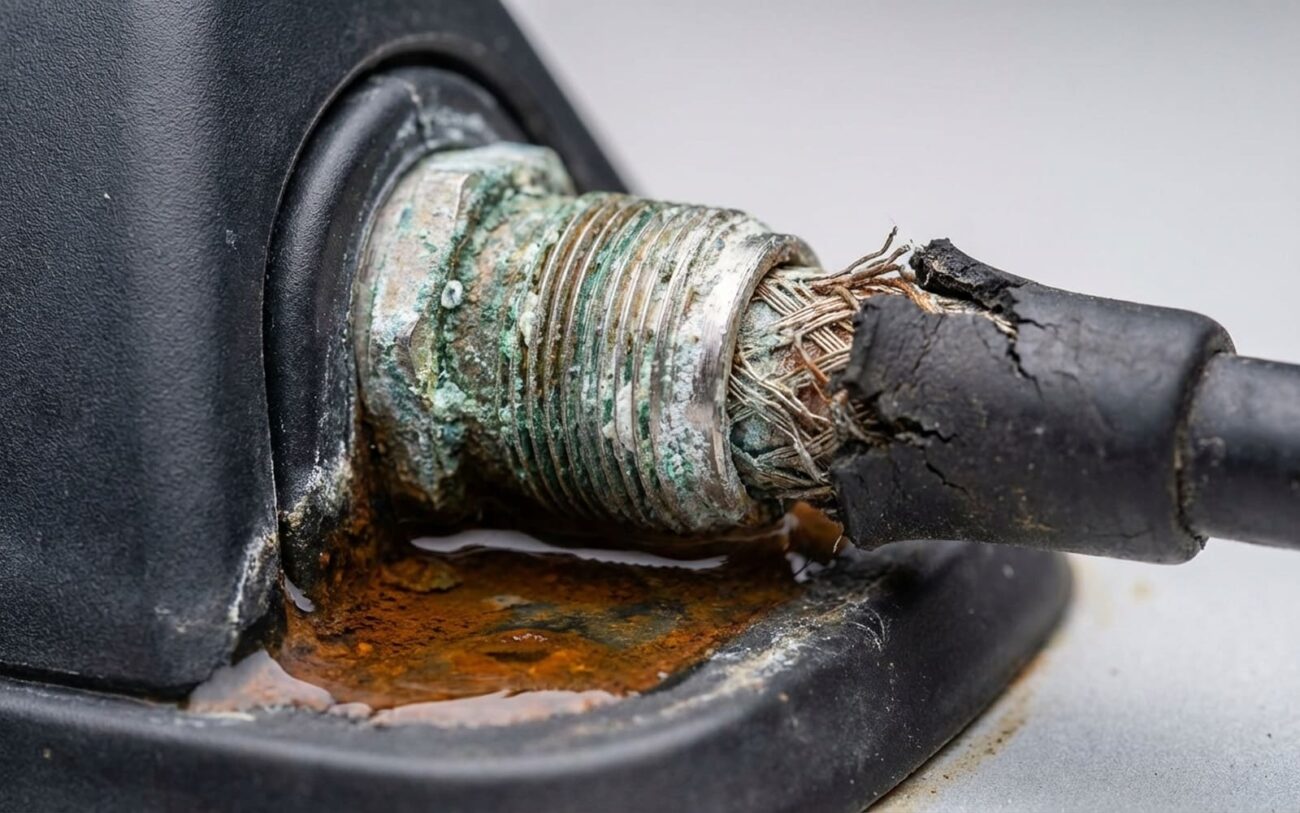
Look—most DIYers won’t have a spectrum analyzer. But you can still do real diagnostics. First, check the antenna connector. It’s usually behind the headliner near the shark fin or under the dash. Look for green corrosion on the pins. That’s moisture damage, and it’s common. Clean it with contact cleaner, apply dielectric grease, and reseat it. But don’t kid yourself: if the gasket’s cracked or the housing’s been wet, that’s not a repair—it’s a temporary patch.
On Toyotas and Hondas, I’ve pulled shark fins with full corrosion on the LNA board—green fuzz on the traces. All from a $5 foam gasket that dried out in the sun. Same on Fords. The fix? Replace the whole antenna assembly with a fresh gasket. Don’t reuse the old one. It won’t seal.
Why These Things Die
Antennas fail from water. Period. The gasket around the base degrades over time—especially in sun-heavy climates. Once moisture gets in, it kills the LNA. I’ve seen antennas from 2015–2018 Camrys with completely corroded boards. Same on F-150s. And physical damage? Automatic car washes, low-clearance garages, hail—any of them can crack the housing or damage the ceramic patch inside.
EMI is rare but possible. I had a Silverado once where a cheap SiriusXM booster was flooding the 1575 MHz band. Killed signal acquisition. Unplugged it, and GPS came right back. But that’s an outlier.
Modules fail differently. The GPS chip is usually a BGA (ball grid array) soldered to the board. Dashboard temps swing from -20°C in winter to 80°C in summer. That thermal cycling cracks solder joints over time. I’ve reflowed dozens of these with a hot air station—sometimes it works, sometimes it doesn’t. If the chip itself is dead, no amount of reflowing helps.
And don’t forget software. Outdated firmware, corrupted almanac data—these can mimic hardware failure. But if the system hasn’t had an update in years, and GPS died suddenly, it’s probably not software. Also: if the module isn’t communicating on the CAN bus (check for other module DTCs), it won’t get GPS data—not because the GPS chip failed, but because the whole unit is offline.
What You Can Actually Do
[DIY-FEASIBLE] Replace roof GPS antenna
Replace or repair module Professional Only
[LAST-RESORT] Clean corroded connector
How I Know It’s Really Fixed
Don’t close the headliner until you’ve tested. After antenna replacement, go to an open area. A good fix means locking onto 8+ satellites within 60 seconds. Most cars have a hidden GPS diagnostic screen—usually a button combo like “Menu + Setup + GPS” at startup. It’ll show satellite count and signal strength. If you don’t know the sequence, look it up for your model. Or use a professional scan tool.
After module work? Clear codes, cycle ignition, drive for 5–10 minutes. Map should update in real time. Location should be accurate. No GPS DTCs should return. And if the module controls audio or climate, test those too. If it was programmed, confirm no warning messages pop up. OEM tools are non-negotiable here—generic scanners won’t cut it.
The Real Cost
| Repair Type | DIY Cost | Shop Cost | Success Rate | Secondary Risk |
|---|---|---|---|---|
| Antenna Replacement | $100 – $300 | $400 – $800 | 95%+ | Over-torquing or poor seal = water leaks, headliner damage |
| Module Replacement | $500 – $1,500 + programming | $1,000 – $2,500 | 98% with proper coding | Wrong coding can brick module or disable infotainment |
| Module Circuit Repair | $200 – $500 (mail-in) | $500 – $1,000 | 70–85% | Hidden faults may cause recurrence; no warranty on reused parts |
Here’s my rule: if the repair costs more than 40% of your car’s current value, walk away. For a 10-year-old SUV worth $6,000, dropping $2,500 on a module isn’t fixing a problem—it’s throwing good money after bad. Use a phone mount. Or a standalone Garmin. You’re not restoring factory function—you’re getting directions. And that’s what matters.
How I Keep It From Coming Back
Prevention starts with installation. If you’re replacing the windshield and the GPS antenna is embedded, make sure the tech transfers the receiver. I’ve had three customers this year come in with “no GPS” after a windshield job—turns out the antenna tab wasn’t reconnected. Same with roof work or headliner repairs. That coaxial connector must be fully seated and sealed.
For early warning, pay attention to first fix time. If it used to lock in 10 seconds and now takes over a minute, the LNA is weakening. That’s your cue to inspect the antenna. And if your car supports navigation software updates—run them. Outdated firmware can mimic hardware failure, and it’s free to fix.
