Screen’s Black, Nav’s Frozen? Let’s Talk Infotainment Software.
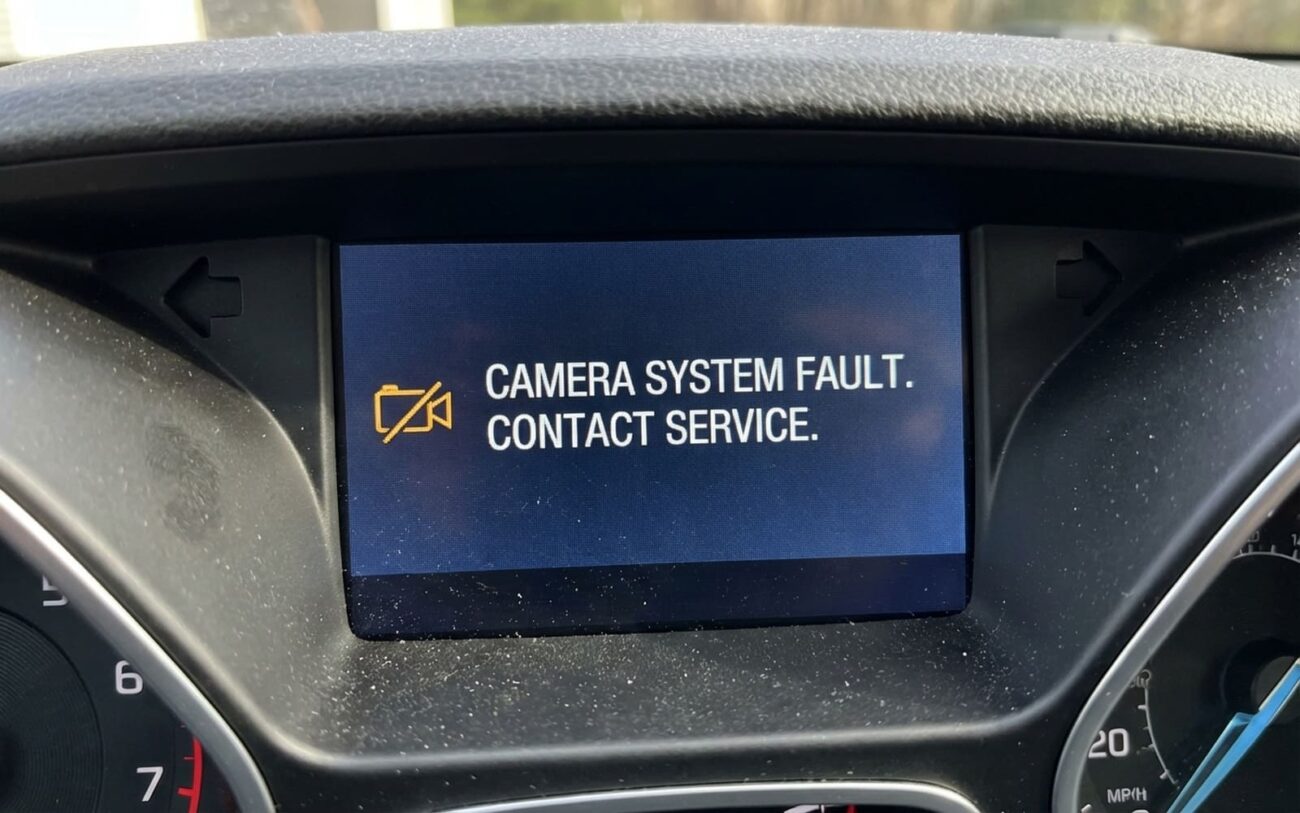
Alright, so your backup camera just went dark, or the navigation system decided to take a permanent coffee break. Your first thought, probably, is that something’s physically broken. And sometimes, sure, a wire’s snapped, or the camera itself has kicked the bucket. But what I’ve seen, especially on anything built in the last decade, is that the real problem often isn’t hardware at all.
More often than not, it’s the software running the whole show. That brain box in your dash, whether you call it the head unit, telematics module, or multimedia system, it’s basically a computer. It controls everything from your GPS and backup camera to your Bluetooth connection and radio presets. Think of it like your smartphone freezing up: the phone itself is fine, but the operating system or an app just crashed.
The good news? If it’s purely a software glitch, you might not need to replace a single part. The bad news? These software faults can mimic hardware failures so perfectly that misdiagnosis is incredibly common. I see it weekly—a tech replaces a perfectly good camera when a simple reflash would’ve had the customer back on the road, saving them a bundle.
How I Spot a Software Problem
After 25 years, I’ve learned that software failures have a distinct pattern. They’re usually intermittent, acting up randomly, and they don’t typically happen because you hit a pothole. For example, if your backup camera only goes black when you shift into reverse, but you can still see the little LED light on the camera itself, that’s a huge clue. The camera’s getting power, so it’s probably functional. The issue? The head unit isn’t processing the video signal, maybe because the camera app crashed or the system just froze when it got the “reverse gear” signal.
Same goes for your navigation system. If it freezes on a “Loading…” screen, reboots itself over and over, or won’t accept your touch input while you’re driving on smooth pavement, that’s not mechanical wear. That’s software instability. We’re talking memory leaks, corrupted processes, or firmware bugs. Another big red flag is corrupted data: your map shows your car driving underwater, or the backup guide lines are all skewed or just plain missing. That usually points to corrupted calibration files or a messed-up map database.
But the most telling sign, the one that screams “software!” to me, is a multi-system failure. If your backup camera, navigation, radio presets, and even your climate control display all go belly-up at the same time, you’re not dealing with a bad sensor or a blown fuse. You’re looking at a system-wide software or firmware issue in that main infotainment module. These modules control a bunch of different systems over the car’s CAN bus network, so one big failure can ripple right across several functions.
Confirming It’s Software, Not Just a Broken Wire
This is where most diagnostics go off the rails. A broken video cable or a failing GPS antenna can look exactly like a software crash. You’ve got to rule out the simple hardware stuff before you even think about software fixes. Always start with the basics: check fuses, inspect connectors for corrosion, and verify power at the camera or antenna. But if all that checks out, then it’s time to dig deeper into the module itself.
I put together this table to help differentiate software-related issues from those sneaky hardware mimics. It’s the practical diagnostic logic I use in my shop every day:
| Symptom | Likely Software/Module Issue | Common External Mimics | Definitive Test to Confirm |
|---|---|---|---|
| Backup Camera Black Screen | Infotainment module software fault, camera application crash, corrupted video driver | Faulty camera, corroded connector, broken video cable, blown fuse, bad ground | Use a capable scan tool to command the camera ON via the module’s service menu. If the command is accepted but the screen stays black, you’re likely looking at a hardware problem (camera, wiring). |
| Navigation System Lockup/Reboot | Operating system fault, memory error in navigation app, corrupted map data | Failing GPS antenna, faulty map SD card (if applicable), overheating module, poor power supply | Scan for Diagnostic Trouble Codes (DTCs) in the telematics or infotainment module. Software faults often generate internal error codes (like U-codes or specific manufacturer codes) that point to software instability. |
| Corrupted Map/Guide Lines | Corrupted calibration or map database files, faulty graphics rendering | Physically misaligned camera, non-OEM map updates, damaged display | Perform a master factory reset (if accessible). If the function returns to normal after the reset, it was almost certainly data corruption. Be aware this erases user data. |
| Multi-System Failure (Nav, Camera, Radio, Climate Display) | Infotainment module base firmware corruption, critical OS crash | Loss of power or ground to the module, weak vehicle battery, CAN bus communication issue | First, check voltage and ground at the module connector. If stable, attempt a firmware reflash using OEM diagnostic tools. If it accepts the reflash and works, it was firmware. If not, the module itself is likely toast. |
Why Software Actually Fails Inside the Module
“Software glitch” sounds vague, I know, but there are specific ways these embedded systems can go sideways. One common culprit is firmware or operating system corruption. This can happen if the module loses power during an over-the-air (OTA) update—say, the car battery dies, or someone cycles the ignition mid-update. I’ve seen it. Also, the module’s flash memory can just degrade over time, leading to bit errors that corrupt critical system files. It’s like a tiny, digital stroke.
Then you’ve got application-level bugs. Your backup camera and navigation are basically separate apps running on the same operating system. Poorly optimized code can cause memory leaks, where the app slowly eats up all the available RAM until it crashes. Or you get “race conditions”—that’s when two processes try to do something at the exact same time and conflict, causing a freeze or a reboot. It’s not magic, it’s just bad code or a stressed system.
What software failure is NOT:
It’s not a severed coaxial cable, a cracked GPS antenna, or a blown fuse. Those are hardware issues, and they need a physical fix. Software problems live in the code and memory—you fix them with resets, reflashes, or, in the worst case, a new module.
Your Options for a Fix, From Simple to Complex
Professional Territory
While some basic resets are DIY-friendly, anything involving firmware reflashing is strictly for the pros. You need specialized J2534 tools, OEM software subscriptions, and a rock-solid power supply. Bricking a module is a very real risk if the voltage drops during the process. Trust me, you don’t want to learn that lesson the hard way.
External Reset or Update DIY Feasible
Module-Level Software Reflash Professional Only
Hardware Replacement Professional Only
Making Sure the Repair Actually Worked
Don’t just assume the job’s done because the screen came back on. You’ve got to validate thoroughly. After a simple software reset or update, I always tell customers to drive it for at least 10 ignition cycles and confirm everything works perfectly. After a full module reflash, the technician needs to verify the installed software version matches the target calibration and then test every single function—camera, nav, audio, climate, Bluetooth. Every button, every menu.
And if it was a module replacement, validation is even more critical. Many systems, especially those with camera-based safety features, require post-installation calibration. This means using a specific target pattern and a diagnostic tool to precisely align things like the parking guide lines. Skipping this step means those lines will be inaccurate, defeating the whole purpose of the repair and potentially causing more headaches down the road.
What’s This Going to Cost, and Is It Worth It?
Here’s the bottom line on what you can expect to pay, and some thoughts on whether it’s worth pouring money into an older system:
| Repair Type | DIY Cost | Shop Cost | Success Rate | Secondary Risk |
|---|---|---|---|---|
| Software Reset | $0 | $50–$100 (for diagnostic time) | High (for minor glitches) | None |
| Module Reflash | Not DIY (unless you own pro tools) | $150–$400 | Very High (if module is healthy) | Bricked module (if power drops) |
| Module Replacement | $500–$2000 (part only) | $750–$2500+ (part & labor) | 100% (if programmed correctly) | Lost features (if not calibrated) |
Cost-Saving Tip from the Shop Floor:
If a new replacement module is going to cost you more than 40% of your car’s current market value, you really need to think hard about it. Sometimes, it makes more sense to just bypass the factory system entirely. Grab a decent standalone backup camera system and use your smartphone for GPS. It’s not as integrated, but it’ll save you from pouring money into an aging, unreliable module.
Stopping It From Happening Again
My Prevention Checklist:
-
Keep your car battery healthy. Low-voltage events are notorious for corrupting memory or interrupting critical over-the-air updates. A weak battery is a software killer.
-
Only use OEM or OEM-licensed sources for map updates. Third-party files, even if they claim to be compatible, can introduce incompatible code or corrupted data.
-
Practice early detection. Pay attention to subtle warnings like slower boot times, occasional screen flickering, or slight delays in response. Catching these early can prevent a full-blown system crash.
