Your car’s connected services have gone dark—remote lock doesn’t work, SOS light’s solid red, OTA updates are blocked—but the radio still plays, Bluetooth calls go through, and the screen isn’t frozen. That’s not a dead battery or a fried head unit. That’s a severed data artery. I’ve seen this exact failure on everything from Toyotas to Teslas, and after 25 years in the bay, I can tell you: 9 times out of 10, it’s either the telematics antenna or the TCU. But before you yank parts, let’s walk through how I diagnose this—step by step, tool by tool—so you don’t waste money on a $400 antenna when the fix was a $5 fuse.
First: Confirm It’s Not Something Stupid (But Common)
Before we touch a scan tool or multimeter, rule out the obvious. I’ve had customers roll in convinced their TCU’s dead—only to find the data plan expired. Check the app. Is it prompting for payment? Did the trial period end? Some manufacturers (looking at you, GM and Hyundai) cut off all services including eCall when the plan lapses. It’s not a hardware failure, but it feels like one.
Next: fuses. Don’t skip this. The telematics module usually pulls power from a dedicated fuse—often labeled “Telematics,” “TMC,” or “Data Link.” On most vehicles, it’s in the underhood junction box or near the instrument panel. Check it with a test light or multimeter. If it’s blown, don’t just replace it. A blown fuse means a short—could be chafed wiring near the TCU or even water in the antenna feed. I’ve seen that on 2018–2020 Fords where the shark fin seal failed and sent moisture down the coax.
If the fuse is good and the subscription’s active, now we’re in real diagnostic territory.
Diagnose the Signal Path: Antenna vs. TCU
The key here is understanding the chain: antenna → coax → TCU → cloud. Break anywhere, and everything downstream dies. But the symptoms tell you where the break is.
Pull out a capable scan tool—something that can access telematics module live data (like Autel, Snap-on, or dealer-level software). Go into the TCU or “Vehicle Connect” menu and check:
-
Cellular signal strength (should be in dBm)
-
Network registration status (registered, searching, denied)
-
DTCs—especially U15xx (lost communication with network) or manufacturer-specific antenna circuit faults
If signal strength reads “0” or “N/A” and the DTC says “antenna circuit open,” that’s pointing hard at the antenna or coax. But—and this is critical—I’ve seen TCUs lock up and report the same thing after a botched OTA update. So before condemning hardware, try a module reset.
If the signal’s still zero after reset, now we test the antenna.
| Symptom | Points to Antenna | Could Also Be… | How to Know for Sure |
|---|---|---|---|
| Total loss of connected services | Internal antenna element cracked or amplifier failed—common in high-frequency modules. | Dead TCU, blown fuse, or expired data plan. |
Disconnect the antenna at its base. Measure resistance between center conductor and shield. ~50 ohms = good. OL or 0 = bad antenna.
|
| U15xx DTC or similar | Water ingress damaging RF connector or cracked solder joints in amplifier. | Coax damage—chafed, pinched, or disconnected between antenna and TCU. |
Wiggle the coax while monitoring DTC status. Resistance mismatch at either end? Cable’s damaged. Open circuit at both ends? Antenna’s dead.
|
| Zero signal on scan tool | Failed amplifier or internal impedance mismatch from physical damage. | TCU modem failure or software lockup. |
Swap in a known-good antenna. Signal returns? Antenna was bad. Still zero? TCU’s the culprit.
|
Why These Antennas Die: Water, Heat, and Dumb Luck
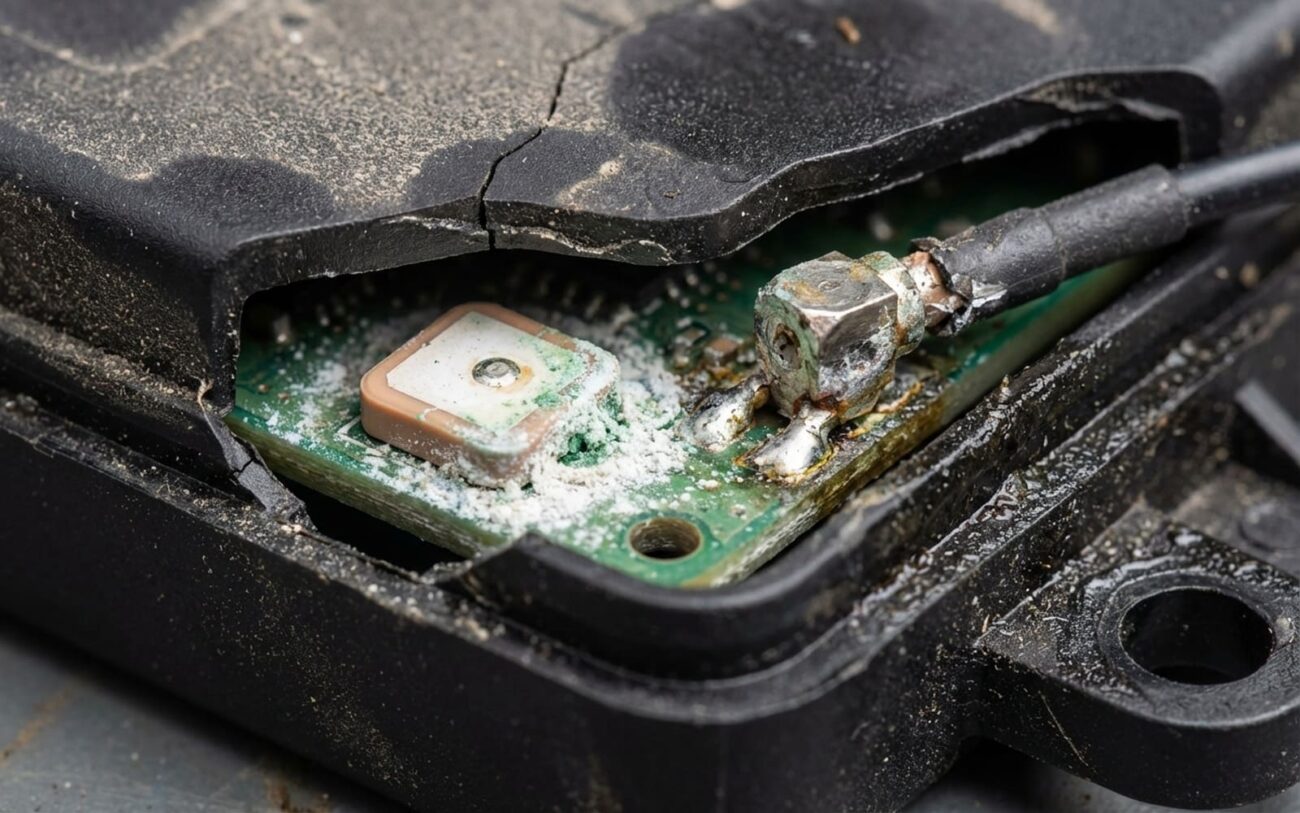
That shark fin on the roof? It’s not just a fin. It’s a sealed RF chamber with an amplifier, impedance-matching circuit, and sometimes GPS and satellite radio guts all crammed in. And it sits in direct sun, then gets blasted with freezing rain. Thermal cycling wrecks the rubber gasket over time. I’ve pulled down fins on 2016–2019 Hondas and found the center pin corroded green from moisture ingress. Same thing on Subarus—poor seal design, and water creeps in after 3–5 years.
Physical damage is another big one. Low garage doors, car wash brushes, even roof racks installed wrong can crack the radome. Once that ceramic or printed antenna element inside fractures, game over. No repair—just replace.
And yeah, some batches were just bad. I remember the 2017–2018 Ram trucks with the T20 antenna—cracked solder joints on the amp chip due to poor thermal relief. Chrysler issued a TSB, but a lot slipped through. If you’re working on one of those, don’t guess. Test first.
How I Fix It: From DIY to Dealer-Level
DIY-FEASIBLE: Roof-mounted shark fin, visible damage.
PROFESSIONAL-ONLY: Internal failure, no visible damage. Professional Only
NON-REPAIRABLE → REPLACE: Corrosion on RF pins?
TEMPORARY: No safe workaround.
Did It Work? Here’s How I Verify
Replacing the antenna isn’t the fix. Verification is.
First, clear all telematics DTCs. Then go into live data and watch the signal strength. You want to see a real number—anything above -105 dBm is acceptable, but -90 or better is solid. If it’s still “0,” the problem’s not solved.
Next, test in the real world. Have the owner send a remote lock command via the app. It should execute in 5–10 seconds. Don’t test in a parking garage or basement—weak external signal will fool you. I once had a customer swear the repair failed, only to find he was testing from his underground lot. Signal bars on the phone? That’s not the same as the car’s cellular module.
Cost, Value, and When to Walk Away
DIY Cost (Parts)
For antenna module replacement.
Shop Cost (Parts & Labor)
For antenna module replacement.
Success Rate
When diagnosis is confirmed with scan tool.
Is it worth it? Depends. If you use remote start in winter, rely on eCall, or want OTA updates, then yes. But if the car’s worth $3,000 and the repair’s $700, maybe not. Just know: a solid SOS light can fail emissions or safety checks in states like New York and Texas. And when you sell, buyers notice. I’ve seen clean trade-ins docked $500 just because the connected services were dead.
Keep It From Happening Again
To Prevent Recurrence
-
If the windshield is replaced and the antenna’s embedded, tell the tech to verify the connector is seated. A loose harness here mimics a dead antenna—and I see it every month.
-
For roof fins, if you remove it (say, for roof rack install), a thin bead of non-hardening sealant (like 3M 08509) around the base can help. But only if the manual allows it—some OEMs want it dry.
-
Use the features. If remote commands start lagging or failing, that’s your early warning. Signal degrades slowly. Catch it early, and you avoid getting stranded without eCall.
